
Table of Contents
- What Is a Microscope Camera System?
- Sensor Size, Pixel Size, and Sampling Fundamentals
- Resolution, Numerical Aperture, and Appropriate Sampling
- C‑Mount Adapters, Tube Factors, and Field of View
- Exposure, Illumination, and Signal‑to‑Noise in Digital Microscopy
- Frame Rate, Rolling vs Global Shutter, and Latency
- Color vs Monochrome Cameras and Spectral Considerations
- Acquisition Software, File Formats, and Calibration
- Common Camera Setups for Brightfield, Phase Contrast, and Reflected Light
- Troubleshooting Image Artifacts and How to Fix Them
- Frequently Asked Questions
- Final Thoughts on Choosing the Right Microscope Camera
What Is a Microscope Camera System?
A microscope camera system is the combination of a digital image sensor, its associated electronics, and the optical interface that projects the microscope’s intermediate image onto that sensor. In practical terms, this usually means a camera body (often with a C‑mount), a relay adapter that connects to a microscope’s trinocular or photo port, and software for control, preview, and image capture. Together, these pieces translate the optical information formed by the microscope objectives into pixels you can save, analyze, and share.

Artist: Kitmondo Marketplace
Although it’s tempting to think of the camera as a simple recording device, it is actually part of the optical train. The camera’s pixel size and the adapter magnification determine how finely the optical image is sampled, and the sensor size constrains field of view. The choice of adapter magnification also affects vignetting and whether the camera captures the full field without clipping. Selecting a microscope camera is therefore less about finding a large number of megapixels and more about matching the camera and adapter to the microscope’s optics and your imaging goals.
Microscope cameras serve many use cases:
- Documentation of prepared slides in brightfield or simple contrast methods.
- Live demonstration for a classroom or outreach event via a projector or monitor.
- Quantitative measurements such as particle sizing, counting, or morphology analysis, which rely on proper calibration and sampling.
- Time‑lapse observations of dynamic samples such as organisms or crystal growth, which benefit from careful control of frame rate and exposure.
To choose and use a camera system effectively, it helps to understand how sensor properties, microscope resolution, and relay optics interact. The next sections build up those concepts from first principles so you can make informed, technically sound decisions.
Sensor Size, Pixel Size, and Sampling Fundamentals

Package size is about 4×4.5 mm with 5×6 balls (presumably 30 contacts). Resolution is 640×480, active area 2.3×2.9 mm, which suggests 1/5" OF.
Artist: Phiarc
At the heart of a microscope camera is the image sensor, typically a CMOS device. Two key descriptors are its physical dimensions (width and height, often summarized by a diagonal) and its pixel size (pitch, usually in micrometers). These numbers determine both how much of the microscope’s intermediate image the camera can capture and how finely it samples that image.
Physical sensor size and field of view
The camera captures a rectangle of the microscope’s intermediate image. The width of that rectangle in the specimen plane is set by the sensor width divided by the total optical magnification from specimen to sensor. For an objective of magnification Mobj, a microscope body tube factor Mtube (often 1.0, but sometimes 1.25× or 1.6×), and a camera adapter/relay of Mrelay, the total magnification to the sensor is:
M_total = M_obj × M_tube × M_relay
Field width in the specimen plane is then:
FOV_width = sensor_width / M_total
and similarly for height. If the sensor is larger than the microscope’s usable image circle, you may see vignetting (dark corners) or loss of sharpness toward the edges. Matching the relay adapter to the sensor size helps fill the frame without clipping or excessive vignetting.
Pixel size and effective sampling at the specimen
Each pixel on the sensor integrates light over its area. That area projected back to the specimen sets the sampling interval in object space:
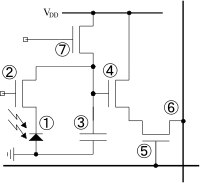
Artist: User:たまなるたみ
pixel_size_object = pixel_size_sensor / M_total
This sampling interval should be small enough to resolve the finest features passed by the microscope optics. If the interval is too large, undersampling produces aliasing—spurious patterns and loss of detail. If the interval is much smaller than necessary, you will oversample—wasting storage and frame rate without gaining optical detail (though oversampling can sometimes help with digital processing and measurement precision).
Megapixels vs. meaningful resolution
Megapixel counts alone do not guarantee more useful detail. Two sensors with the same pixel count but different pixel sizes will behave differently once paired with a microscope. For microscopy, the right question is whether pixel size after projection to the specimen meets the sampling criterion based on numerical aperture and wavelength.
Monochrome vs. color pixel layouts
Monochrome sensors have identical sensitivity at each pixel and record intensity without color filters. Color sensors add a color filter array (often a Bayer pattern) so that neighboring pixels measure different spectral bands. With color sensors, final color images are reconstructed by demosaicing. Because only a subset of pixels sample a given color channel, effective sampling for any one color is coarser than the raw pixel pitch. This has implications for Nyquist sampling (see Color vs Monochrome), often motivating slightly finer sampling for color work to guard against color aliasing.
Pixel binning and on‑chip aggregation
Many CMOS sensors support binning, which combines adjacent pixels into a single larger pixel. Hardware binning (performed before readout on some sensors) increases signal and can improve signal‑to‑noise ratio when noise is dominated by read noise. The trade‑off is reduced sampling resolution and smaller image dimensions. Binning by a factor of N in each axis increases effective pixel size by N (area by N²), and, for shot noise limited signals, increases signal‑to‑noise by roughly √(N²) = N, while lowering max spatial frequency you can represent by the same factor.
Resolution, Numerical Aperture, and Appropriate Sampling
Optical resolution in a microscope is governed by diffraction, numerical aperture (NA), and wavelength. For incoherent widefield imaging, a useful approximate measure of lateral resolution is the Rayleigh criterion, which gives the distance between Airy disk peaks where two points are just resolved:
d_Rayleigh ≈ 0.61 × λ / NA
Here, λ is the relevant wavelength of light and NA is the objective’s numerical aperture. Higher NA and shorter wavelengths produce finer detail. In fluorescence imaging, λ is typically taken as the emission wavelength band’s central value; in brightfield white‑light imaging, practical contrast and detection are often dominated by the green region of the spectrum.
From optical resolution to sampling requirements
To represent the optical information digitally without aliasing, sampling must meet the Nyquist criterion. For incoherent imaging, the optical transfer function has a cutoff spatial frequency in object space of:
f_c = 2 × NA / λ (cycles per unit length)
Nyquist sampling requires a pixel spacing in object space no larger than half the period of the highest transmitted spatial frequency:
pixel_size_object ≤ 1 / (2 × f_c) = λ / (4 × NA)
This relation provides a practical target for setting the camera’s effective pixel size via the choice of sensor pixel pitch and relay magnification. It is more conservative than rules of thumb tied to 0.5× or 0.33× of Rayleigh’s distance because it references the actual frequency cutoff for incoherent imaging.
Choosing a wavelength for calculations
Because white light spans a range of wavelengths, it is common to approximate λ by the mid‑visible spectrum (around green). For fluorescence, use the emission band center of the fluorophore being recorded. When in doubt, compute a range using plausible λ values to get a sense of how sampling demands shift across the spectrum. Shorter wavelengths require finer sampling.
Relating sampling back to sensor pixel size
Given a target pixel_size_object from the Nyquist relation, you can determine the required sensor pixel size, or, equivalently, the relay magnification needed for a given sensor:
- Given sensor pixel size
p_sensorand total magnificationM_total:pixel_size_object = p_sensor / M_total. - To achieve target
p_target = λ / (4 × NA), chooseM_total ≥ p_sensor / p_target.
If your microscope’s body has a built‑in tube factor and the objective magnification is fixed by the observation you need, the adjustable parameter is typically the camera relay adapter. Increasing relay magnification reduces field of view but produces finer sampling (smaller effective pixels in object space). Decreasing relay magnification expands field of view at the expense of coarser sampling.
Practical guardrails
- Undersampling manifests as moiré and jagged edges on fine structures. If you see aliasing artifacts, consider increasing relay magnification or using a sensor with smaller pixels.
- Oversampling by a factor of 1.5–2 relative to Nyquist can be helpful when using color sensors (see Color vs Monochrome) or when post‑processing requires interpolation.
- The optical point spread function broadens as NA decreases and with defocus; if your experiments consistently operate at lower NA (e.g., through closed condenser apertures), the sampling requirement relaxes accordingly. However, this comes at a real cost to optical resolution and contrast—see Exposure and Illumination for balanced settings.
C‑Mount Adapters, Tube Factors, and Field of View

Artist: Hustvedt
Most microscope cameras connect via a C‑mount, a standardized 1‑inch thread with a defined flange focal distance. The microscope’s trinocular or photo port presents an intermediate image that must be relayed to the camera’s sensor at the right magnification. This is the job of the camera adapter (also called a C‑mount relay), which typically contains one or more lenses to scale the image.
Relay magnification and matching to sensor size
Adapters are commonly labeled by their magnification factor (e.g., 0.35×, 0.5×, 1.0×, 1.6×). Lower factors project a wider field onto the sensor (useful for small sensors), while higher factors crop into the field (useful for large sensors or when you need finer sampling). Selecting the factor is a balancing act among:
- Field coverage: Fit as much of the intermediate image as the sensor and microscope allow without vignetting.
- Sampling: Achieve the target Nyquist pixel size in object space.
- Working distance for ergonomics and mechanical clearance.
On systems with interchangeable eyepieces, the intermediate image diameter is often linked to the eyepiece field number (FN), specified in millimeters. If your camera sensor diagonal projected through the relay exceeds the usable image circle, expect vignetting. Many users intentionally accept minor vignetting to gain field width; others prefer a slightly higher relay magnification to avoid dark corners. There is no harm in either choice if it meets your imaging goals.
Parfocality and visual/camera alignment
For live work, it is helpful if the camera and eyepieces are parfocal: a sample in focus through the eyepieces is also in focus on the camera. Achieving this depends on the microscope’s trinocular design. Some systems include a focusing mechanism in the camera adapter or phototube to offset sensor position. If your camera is consistently off in focus relative to the eyepieces, look for an adjustable relay or a small focusing sleeve on the phototube. After adjustment, check across a range of objectives, as small residual differences can appear due to objective parfocality tolerances.
Switching between eyepieces and camera
Many trinocular heads include a selector to send light either to the eyepieces or the camera, or to split between them. Splitting reduces brightness in each path. For brightfield documentation this is rarely a problem, but it can matter for low‑light work. If you notice noise rising when splitting, consider dedicating more light to the camera for capture, or lengthening exposure as discussed in Exposure and SNR.
Back focus and mechanical stability

Artist: TylerOptics
C‑mount systems assume a standard flange distance, but microscope adapters may add extension tubes or adjustable collars. Mechanically solid, square alignment prevents tilt‑induced focus gradients across the frame. If one side of your image is soft, check for loose set screws, unseated adapters, or misalignment in the relay stack. Mechanical steadiness is also important for time‑lapse sequences to avoid drift.
Exposure, Illumination, and Signal‑to‑Noise in Digital Microscopy
Digital image quality is bounded by the signal you collect and the noises that accompany it. Understanding exposure and illumination helps you balance noise sources, preserve dynamic range, and avoid saturation.
Key noise sources
- Shot noise: Arises from the quantum nature of light; it scales with the square root of the number of detected photons. When photon counts are high, shot noise dominates and signal‑to‑noise ratio (SNR) improves as √N.
- Read noise: Introduced by sensor electronics during readout and amplification. It is approximately independent of signal level and becomes important at short exposures or in low light.
- Dark current noise: Thermal electrons collected during exposure. It accumulates with exposure time and temperature. Actively cooled cameras suppress dark current for long exposures; for brightfield exposures of milliseconds, dark current is typically negligible.
Exposure time, illumination intensity, and SNR
For a given specimen and optical setup, the number of photons per pixel is proportional to illumination intensity and exposure time. If read noise limits your SNR, increasing exposure or illumination lifts the signal above the read noise floor, often dramatically improving image quality. If you are already shot‑noise limited (bright samples, longer exposures), increasing exposure yields diminishing returns in SNR because noise grows with √N while signal grows with N. The practical approach is to expose long enough to reach shot‑noise dominance while avoiding motion blur and saturation.
Aperture settings and contrast
In transmitted‑light microscopy, the condenser aperture diaphragm sets the effective illumination NA and thus influences resolution and contrast. A fully open condenser maximizes resolution and brightness but can reduce contrast; partially closing the condenser increases contrast while lowering resolution and brightness. Because resolution depends on NA, overly closed apertures reduce the optical bandwidth and thus relax sampling requirements (see Resolution and NA)—but that relaxation corresponds to real loss of fine detail. Use the smallest closure that provides adequate contrast for your specimen and camera.
Gain and dynamic range
Many cameras offer analog or digital gain controls. Analog gain boosts the sensor output before digitization, effectively converting electrons to larger digital units. Increasing gain can help when read noise is significant, but it reduces the full‑well capacity you can map to the available bit depth, potentially clipping highlights. Digital gain (post‑digitization) does not improve SNR; it simply rescales values. As a rule, use the lowest gain that achieves sufficient separation of signal from the read noise floor consistent with your exposure constraints.
Dynamic range is often summarized by the ratio of full‑well capacity to read noise (expressed in electrons). Bit depth (e.g., 12‑bit, 14‑bit, 16‑bit) indicates the number of discrete digital levels but does not guarantee usable dynamic range if the analog noise is high. Choose bit depth based on the scene’s contrast and your need for quantitative analysis; higher bit depths are helpful when you are well above read noise and want to preserve small intensity differences.
White balance and color fidelity
For color cameras, white balance corrects for the spectral distribution of illumination so that neutrals appear neutral. In transmitted brightfield, illumination from a halogen or LED source can skew warm or cool. Set white balance using a blank region of the slide or a neutral reference. When quantitative color is important (e.g., consistent documentation), maintain constant illumination settings and white balance across sessions. For more about spectral issues and filters, see Color vs Monochrome.
Neutral density and exposure control
When illumination is too bright to allow comfortable exposure times or avoid saturation at the desired aperture settings, neutral density (ND) filters reduce intensity without significantly altering color balance. Use ND to keep exposure and frame rate in a range that avoids motion blur while preserving SNR.
Frame Rate, Rolling vs Global Shutter, and Latency
Live display quality and the ability to capture motion depend on how fast the camera can read out the sensor and how it exposes pixels across the frame.
Frame rate basics
Frame rate (frames per second, fps) depends on sensor design, readout mode, and chosen resolution/region of interest (ROI). Reducing the ROI often increases frame rate by reading fewer pixels per frame. For dynamic samples, prioritize short exposure times to freeze motion; this usually implies brighter illumination to maintain SNR. Keep in mind that very short exposures yield fewer photons per pixel and can push you into read‑noise‑limited performance.
Rolling vs global shutter
- Rolling shutter: Rows expose and read sequentially. This can introduce geometric distortions if the subject moves during the frame or if illumination varies with time. Rolling shutters are common and work well for static scenes or modest motion.
- Global shutter: All pixels expose simultaneously, then read out. This avoids rolling artifacts and is preferred when motion is significant or where synchronized illumination is used. Global shutter designs can have different noise and sensitivity characteristics compared to rolling sensors; assess based on your application.
Latency and live‑view ergonomics
Display latency matters for teaching and manipulation under the microscope. Latency includes exposure time, sensor readout, data transfer, and display rendering. To reduce latency, use shorter exposures (brighter light or higher gain), restrict ROI to increase fps, and prefer direct USB/Thunderbolt to high‑latency network links. Software with efficient rendering pipelines also helps maintain smooth live previews.
Color vs Monochrome Cameras and Spectral Considerations
Choosing between color and monochrome sensors depends on your imaging goals. Each has clear advantages.
When color is appropriate
Color cameras are ideal for educational demonstrations, documentation of stained specimens, and any context where naturalistic appearance matters. The color filter array enables RGB images in a single exposure without external filter wheels. However, each color channel is sampled on a subset of pixels, and demosaicing reconstructs full‑resolution color. Effective sampling per color is therefore coarser than the nominal pixel pitch, and color aliasing can appear if sampling at or near the Nyquist limit.
Practical implications:
- Consider modest oversampling (smaller effective pixel size in object space) to mitigate color aliasing artifacts.
- Apply careful white balance and, if available, color profiles matched to your illumination.
When monochrome is advantageous
Monochrome sensors route all collected photons to a single channel with no color filters, improving sensitivity for a given exposure. Spatial sampling is uniform across the array, making them well‑suited for quantitative intensity measurements and for low‑light modalities where maximizing SNR is important. If you need color with a monochrome sensor, you can add external color filters and acquire sequential images, but this adds complexity and is not suitable for moving samples.
Spectral response and illumination
Sensor quantum efficiency varies with wavelength, and camera manufacturers usually provide spectral response curves. While the exact values differ among sensors, a general pattern is peak sensitivity somewhere in the visible range and reduced response toward the extremes. For color sensors, the RGB filters further shape the spectral response. Pairing illumination and filters with your camera’s sensitivity can improve efficiency. For example, if a stain primarily transmits in the green, matching your white balance and exposure to exploit that band will help SNR.
Infrared and UV considerations
Many cameras include IR‑cut filters to approximate human color vision. If your application uses near‑infrared or ultraviolet, ensure that the sensor and optics support those wavelengths and that any blocking filters are removed or replaced appropriately. Be mindful that many microscope objectives are corrected for the visible spectrum; performance may change outside that range.
Acquisition Software, File Formats, and Calibration
The camera is only as effective as the software that controls it and the workflow that turns pixels into information. Even simple documentation benefits from repeatable settings and proper calibration.
Live control and capture settings
Core functions include exposure time, gain, white balance (for color), ROI selection, and frame rate control. Many applications allow saving exposure presets for different objectives or contrast methods. For teaching, an on‑screen grid or guiding reticle can help students understand scale and orientation. Remember to tie each preset to the objective magnification and the relay adapter you use so that sampling and scale remain consistent.
File formats and metadata
- Lossless formats (e.g., TIFF) preserve pixel values for analysis and archiving.
- Compressed formats (e.g., JPEG, H.264 for video) save storage and bandwidth but may introduce compression artifacts and are less suitable for quantitative work.
- Metadata such as exposure, gain, objective magnification, relay factor, and calibration should be recorded with each image. If the software supports embedded metadata, enable it for reproducibility.
Scale calibration and measurement
To convert pixels to micrometers, calibrate with a stage micrometer. Capture an image at a known objective and camera configuration, measure the pixel length corresponding to a known micrometer distance, and compute the scale factor. Repeat for each objective and for any change in relay or ROI. Many programs will store a calibration table you can select from during measurement. Once calibrated, you can add accurate scale bars to images and perform measurements like lengths, areas, and counts with confidence.
Example workflow:
- Place the stage micrometer and bring a known graticule into sharp focus.
- Acquire an image at your typical exposure and illumination settings.
- Use the software’s calibration tool to map pixels to the known distance.
- Save this calibration under a descriptive name (e.g., “20× objective, 0.5× relay, full sensor ROI”).
Color management
For consistent rendering across devices, keep white balance fixed for a given session and illumination, and avoid ad‑hoc contrast stretching that can misrepresent colors. If your workflow demands high fidelity, consider a reference slide and a repeatable capture protocol. Document any post‑processing steps to support reproducibility.
Common Camera Setups for Brightfield, Phase Contrast, and Reflected Light
While microscope cameras and adapters are flexible, certain patterns recur across modalities. The following non‑prescriptive configurations illustrate typical choices and the reasoning behind them. Adjust to your microscope’s specifics and the sampling targets outlined in Resolution and NA.
Brightfield documentation and teaching
- Camera: Color CMOS for naturalistic images and easy interpretation.
- Adapter: A relay factor that fills most of the sensor without vignetting; choose to reach adequate sampling at the highest NA you commonly use.
- Exposure/illumination: Modest exposure times to keep live view smooth; ND filters if needed for comfortable exposure without closing the condenser excessively.
- Software: On‑screen scale bar, white balance preset per illumination setting.

Artist: Peter Mash
Rationale: In brightfield, light levels are ample, and color is informative for stained specimens. Slight oversampling reduces color aliasing and gives clean text rendering for annotations.
Phase contrast and other low‑contrast transmitted methods
- Camera: Color or monochrome, depending on whether you value color. Monochrome improves sensitivity slightly.
- Adapter: Similar sampling targets as brightfield; ensure the relay does not vignette the annulus region (visible as bright ring out of focus).
- Exposure/illumination: Slightly longer exposures can help capture subtle intensity variations; avoid over‑closing the condenser, which reduces phase contrast effectiveness.
Rationale: Phase contrast benefits from good SNR and stable illumination. Because detail is often near the detection limit, attention to Nyquist sampling and noise pays dividends.
Reflected light (epi‑illumination) on opaque specimens
- Camera: Color for materials with chromatic features; monochrome if you need maximum sensitivity or quantitative reflectance.
- Adapter: Target sampling based on the objective NA used in reflected light; objectives may have different NAs than their transmitted‑light counterparts.
- Exposure/illumination: Control glare and specular highlights with polarization if your microscope supports it; avoid sensor saturation which clips detail.
Rationale: Reflected‑light scenes can present high contrast. Preserving highlight detail and controlling reflections is more important than in transmitted modalities. Sampling considerations remain the same: match to NA and wavelength.
Low‑light transmitted scenes
- Camera: Monochrome preferred for best sensitivity.
- Adapter: Consider larger relay magnification to reduce pixel_size_object and allow for lower gain at a given exposure.
- Exposure/illumination: Longer exposures support shot‑noise dominance; stabilize the sample mechanically.
Rationale: When photon budgets are tight, every electron counts. Reducing read noise impact and avoiding unnecessary color filters both help SNR.
Troubleshooting Image Artifacts and How to Fix Them
Even a well‑matched camera can produce puzzling images. Here are common artifacts and systematic ways to address them.
Aliasing and moiré on fine structures
Symptoms: Repeating patterns that change with focus or magnification; jagged edges on diagonal lines; false color in color cameras.
Causes: Undersampling relative to the microscope’s optical bandwidth; demosaicing artifacts.
Fixes:
- Increase relay magnification to reduce pixel_size_object (see sampling requirements).
- Use a sensor with smaller pixels.
- For color cameras, apply slight oversampling and ensure high‑quality demosaicing in software.
Vignetting and dark corners
Symptoms: Darkening toward frame edges, sometimes asymmetric.
Causes: Sensor size exceeding the microscope’s image circle when used with a low‑magnification relay; misalignment; partial shuttering of the port.
Fixes:
- Increase relay magnification or reduce ROI to stay within the illuminated field (see C‑mount adapters).
- Check for mechanical obstructions, unseated adapters, or tilted mounts.
Uneven illumination (shading)
Symptoms: Bright center with dim edges, or smooth gradients across the frame.
Causes: Suboptimal alignment of the illumination system; field diaphragm not set; lamp or LED nonuniformity; dust or smudges.
Fixes:
- Align illumination following your microscope’s instructions; ensure the field diaphragm is centered and adjusted.
- Clean accessible, safe‑to‑clean optical surfaces (following proper care guidelines) to remove dust that can cast broad shadows out of focus.
- Use flat‑field correction in software if needed for quantitative work.
Color casts and white balance drift
Symptoms: Images look too warm/cool; inconsistent colors between sessions.
Causes: Illumination spectrum changes (e.g., variable LED color with intensity), automatic white balance applied inconsistently.
Fixes:
- Use a fixed white balance preset for a given illumination setting (see White balance).
- Maintain constant illumination intensity and spectrum between captures.
Focus mismatch between eyepieces and camera
Symptoms: Specimen appears focused in eyepieces but soft on camera (or vice versa).
Causes: Photo port not parfocal with eyepieces; adapter not at correct back focus; sensor tilt.
Fixes:
- Adjust the phototube or adapter focus if available (see Parfocality).
- Check for tilt and secure all mechanical interfaces.
Noise and grain at short exposures
Symptoms: Grainy images despite bright samples; noisy shadows.
Causes: Read‑noise dominance due to very short exposures or low gain settings.
Fixes:
- Increase exposure time or illumination to raise signal above read noise (see Exposure and SNR).
- Use moderate analog gain to better match signal to the digitizer while avoiding saturation.
Jitter or motion blur in live view
Symptoms: Smearing of moving structures; laggy previews during manipulation.
Causes: Exposures too long for sample motion; frame rate limitations.
Fixes:
- Shorten exposure with brighter illumination, and reduce ROI to increase fps (see Frame rate).
- Consider a global shutter sensor if rolling artifacts are visible.
Frequently Asked Questions
How do I choose a relay magnification for my sensor?
Start by computing your target sampling in object space using pixel_size_object ≤ λ / (4 × NA) from Resolution and NA. With your sensor pixel size p_sensor, set M_total ≥ p_sensor / p_target. Given your objective and any microscope tube factor, solve for the relay magnification that brings M_total to the required value. Then check whether the resulting field of view, FOV_width = sensor_width / M_total, fits within the microscope’s image circle without excessive vignetting as described in C‑Mount Adapters. If you see minor vignetting but are happy with coverage, you can keep the lower relay factor; otherwise, step up one size.
Is higher bit depth always better for microscope imaging?
Higher bit depth provides more digital levels, which can preserve subtle intensity differences—useful for quantitative analysis and post‑processing. However, it does not increase optical resolution or SNR on its own. If your images are dominated by read noise or if the scene’s dynamic range is limited, 12‑ or 14‑bit can be sufficient. When you are well above read noise (shot‑noise limited) and want to avoid banding in smooth gradients or maintain measurement precision, 16‑bit capture can be advantageous. Match bit depth to your signal quality and storage constraints, and ensure that downstream software can handle the chosen format as discussed in File Formats and Metadata.
Final Thoughts on Choosing the Right Microscope Camera
Microscope cameras are not merely recorders; they are active optical components that must be matched to your objectives, illumination, and goals. The core principles are straightforward:
- Let numerical aperture and wavelength set the target sampling:
pixel_size_object ≤ λ / (4 × NA). - Use sensor pixel size and relay magnification to achieve that sampling while delivering the field of view you need.
- Balance exposure, gain, and illumination to reach shot‑noise‑dominated conditions without motion blur or saturation.
- Choose color for naturalistic documentation and teaching; choose monochrome for maximum sensitivity and uniform sampling.
- Calibrate your system for accurate scale and capture repeatable metadata.
With these tools, you can evaluate any camera and adapter combination on first principles, independent of marketing terms. As you refine your setup, revisit the interlinked sections on sensor and pixel fundamentals, adapters and field of view, and exposure and SNR to make adjustments grounded in optical theory.
If you found this guide helpful, explore our other deep‑dive articles on microscopy optics and imaging workflows, and subscribe to our newsletter to receive future installments in this series directly in your inbox.


