
Table of Contents
- What Is Microscope Illumination and Why It Matters?
- LED vs Halogen vs External Fiber-Optic Light Sources
- Achieving Köhler Illumination: Required Accessories and Steps
- Picking the Right Condenser: Abbe, Achromatic-Aplanatic, Phase, Darkfield
- Filters, Diffusers, and Color Control for Better Contrast
- Apertures and Diaphragms: Field Iris vs Condenser Iris
- Ring Lights and Epi-Illumination Accessories for Opaque Samples
- Illumination, Cameras, and Exposure: Practical Considerations
- Compatibility and Retrofitting: Power, Mounts, and Safety
- Common Illumination Mistakes and How to Fix Them
- Frequently Asked Questions
- Final Thoughts on Choosing the Right Microscope Illumination Accessories
What Is Microscope Illumination and Why It Matters?
Illumination is more than simply making a specimen visible—it determines contrast, color fidelity, apparent sharpness, and the uniformity of the field. In optical microscopy, the path and distribution of light are as critical as the optics themselves. The right combination of light source, condenser, diaphragms, and filters allows the objective lens to reach its potential and the camera—or the human eye—to see a clean, high-contrast image.
At the heart of illumination is the concept of numerical aperture (NA), which governs how much angular range of light participates in forming the image. For the objective, NA directly influences resolution through the relationship:
d ≈ 0.61·λ / NA_objective
where d is the smallest resolvable distance for an incoherent imaging condition and λ is the wavelength. The condenser NA does not change the objective’s fundamental diffraction-limited resolution, but it strongly affects contrast and the efficiency with which high spatial frequencies are illuminated. With Köhler illumination and a properly opened condenser aperture, the specimen is illuminated over a large angular range, which supports finer detail and a flatter contrast transfer. Closing the condenser aperture increases depth of field and image contrast but reduces the contribution of higher spatial frequencies, softening the finest detail.

Illumination also has a coherence aspect. Highly collimated or coherent light (for example, from a laser) behaves differently than the partially incoherent light typically used in brightfield microscopy. Köhler illumination intentionally creates uniform, spatially uncorrelated illumination at the specimen plane to minimize shadows and artifacts. That uniformity depends strongly on accessories: the field diaphragm, condenser, and the ability to center the illumination pathway.
This article provides a practical guide to the main accessories that shape illumination quality: light sources, condensers, filters, diaphragms, and specialized options like ring lights. We also cover camera exposure and color management (see here), plus compatibility considerations (retrofitting tips).
LED vs Halogen vs External Fiber-Optic Light Sources
The light source sets the baseline for brightness, color quality, and thermal load. Common options include integrated LED illuminators, traditional halogen bulbs, and external fiber-optic illuminators feeding light through a guide into the microscope.
LED illuminators
LEDs dominate contemporary microscopes because they are efficient, compact, and long-lived. Key points:
- Spectrum and color temperature: White LEDs produce light by exciting a phosphor with a blue emitter. The spectrum is broad but has a distinct blue component and a phosphor-generated continuum. The correlated color temperature (CCT) is typically fixed by the LED design (e.g., ~3000–6500 K across available products), affecting the warmth/coolness of the image.
- Color rendering: Color Rendering Index (CRI) varies by LED formulation. High-CRI LEDs better reproduce colors across the spectrum, which is useful for histological stains and educational work where faithful color is important. For purely monochrome imaging, CRI matters less, but spectral distribution matters for filter-based contrast techniques.
- Dimming and flicker: LEDs are current-driven devices. Dimming is achieved by either current reduction or pulse-width modulation (PWM). PWM at sufficiently high frequency is typically not perceptible and avoids color shifting, but at low PWM frequencies some cameras can show banding or flicker. Constant-current analog dimming avoids banding but can shift color slightly depending on LED design.
- Heat and safety: LEDs still generate heat at their junction and in the driver, but the radiant infrared output on the specimen is comparatively low versus halogen. This helps prevent sample heating.)
Advantages of LEDs include fast turn-on, low maintenance, and stable output. When retrofitting, ensure the LED unit provides adequate radiant flux into the microscope’s illumination path and that the field diaphragm and collector optics can be properly conjugated.
Halogen bulbs
Halogen lamps are tungsten filament bulbs with a halogen gas that stabilizes filament evaporation, enabling hotter operation and a higher color temperature than standard incandescent bulbs. Characteristics:
- Continuous spectrum: Halogen emits a smooth, continuous spectrum across visible and into infrared. This can be beneficial for color fidelity and for filter-based contrast where a broad spectrum is desirable.
- Color temperature and dimming: Reducing voltage dims the lamp but also warms the color temperature. Many microscopes include a blue filter to compensate at lower brightness settings. Unlike PWM LED dimming, halogen dimming is flicker-free but color shifts are inherent to filament physics.
- Heat and life: Halogen radiates significant infrared; excess heat can affect sensitive specimens and resin-mounted slides. Bulbs have finite lifetimes and require occasional replacement. Proper alignment (centering the filament image in the collector) is part of achieving good Köhler illumination.
Halogen is still appreciated in teaching labs for its spectral uniformity and familiar appearance. If your microscope supports both LED and halogen lamphouses, choosing between them often comes down to spectral needs and convenience.
External fiber-optic illuminators
External illuminators route light from a high-intensity source through a fiber bundle or light guide into a microscope or to free-space adapters. Use cases include ring lights and gooseneck spotlights commonly used with stereo microscopes and reflected-light applications.
- Sources: Light engines can be LED-based or (in older systems) metal-halide or halogen. LEDs paired with fiber outputs provide bright, relatively cool illumination at the working distance needed for macroscopic specimens.
- Modularity: Gooseneck guides, ring light heads, and line guides allow flexible lighting geometries—critical for reducing glare, creating shadows, or producing uniformly shadowless light.
- Advantages: Separating the light source from the specimen reduces radiant heat and frees space around the sample area. Many units offer intensity control and interchangeable filters.
When selecting a fiber-optic illuminator, ensure the output head matches your microscope’s accessory mount and that the light distribution suits your task—tight spot beams for raking oblique illumination, or ring lights for even, shadowless lighting.
Achieving Köhler Illumination: Required Accessories and Steps

Images donated as part of a GLAM collaboration with Carl Zeiss Microscopy – please contact Andy Mabbett for details. Artist: ZEISS Microscopy from Germany
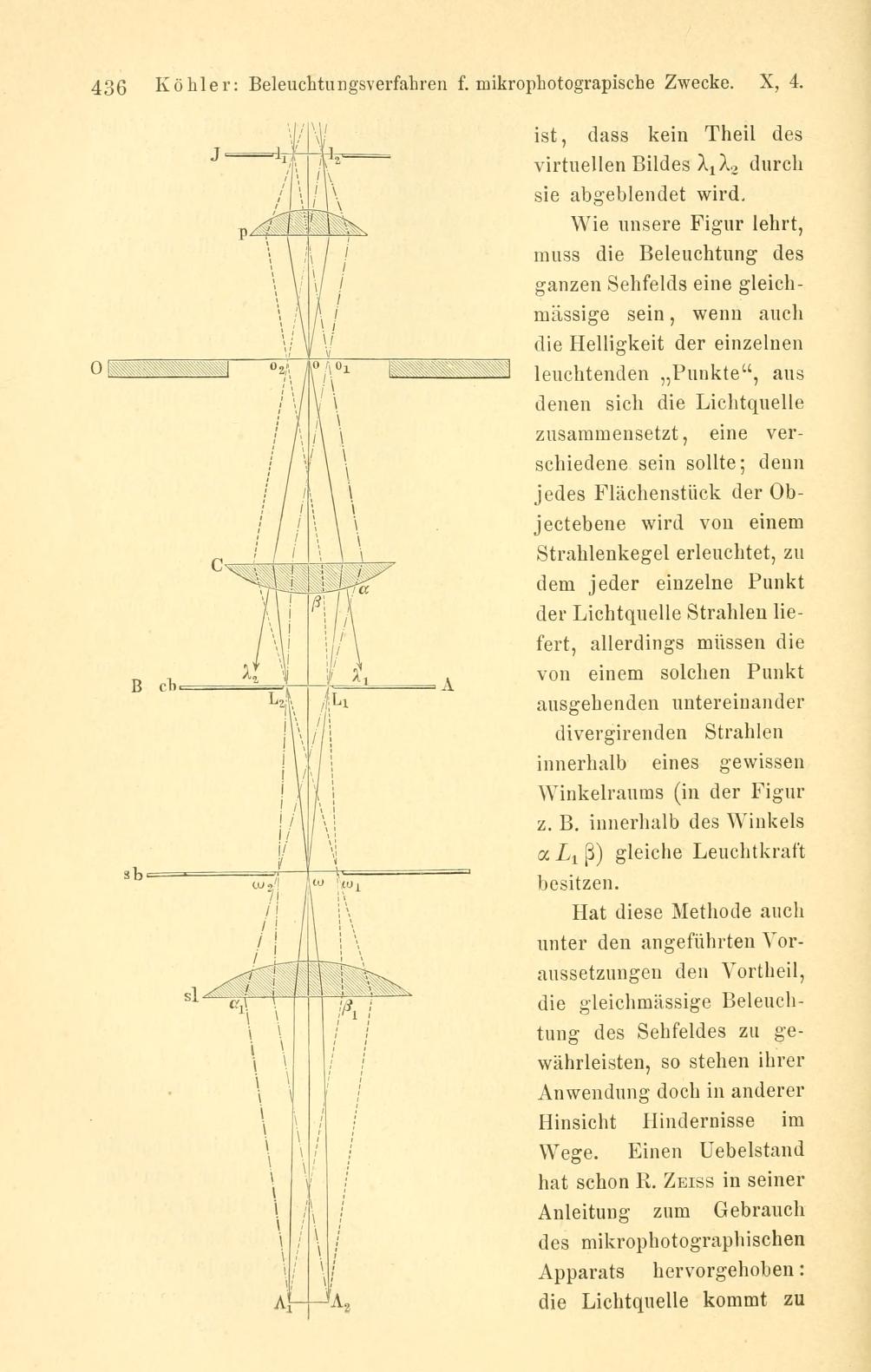
Köhler illumination is the standard method for brightfield transmitted light because it creates even, flare-free illumination and decouples the imaging of the light source from the specimen plane. To implement Köhler, your microscope needs:
- A field diaphragm (field iris) in the illumination path
- A collector lens that focuses the light source onto the condenser aperture plane
- A focusing, centerable condenser with an aperture diaphragm
Many modern compound microscopes include these components. If you have an educational stand without a field diaphragm or a fixed condenser, consider upgrading with accessory kits if available from the manufacturer.
Optical conjugate planes
Köhler works by arranging the system so that the lamp filament (or LED emitter) is focused in the plane of the condenser aperture and not in the specimen plane. Meanwhile, the field diaphragm is imaged onto the specimen plane. This yields two sets of conjugate planes:
- Source conjugates: light source → collector lens → condenser aperture diaphragm → back focal plane of the objective
- Field conjugates: field diaphragm → specimen → intermediate image plane → camera/eyepiece field stop
Because the filament/LED is not imaged at the specimen, irregularities in the source do not appear as structure in the image, improving uniformity and reducing glare.
Step-by-step alignment
- Set up the specimen and focus the objective. Start with a mid-range objective (e.g., 10x). Focus on a specimen of modest contrast.
- Close the field diaphragm. Stop it down until you see its polygonal edge in the field.
- Focus the condenser. Use the condenser focus control to bring the edge of the field diaphragm into sharp focus in the specimen plane. This ensures the field diaphragm is conjugate to the specimen.
- Center the field. Use the condenser centering screws to center the image of the field diaphragm in the field of view.
- Open the field diaphragm. Expand it until its edge just disappears outside the field of view. This sets the illuminated field to match the observation field.
- Set the condenser aperture. Adjust the condenser aperture diaphragm so that its NA is typically around 0.6–0.9 of the objective’s NA. This balances resolution and contrast. A common starting recommendation is about 2/3 of the objective NA. You can check the effect by opening and closing the diaphragm while observing contrast and fine detail.
This aperture vs field diaphragm distinction is crucial: the field iris limits the area of illumination, while the condenser iris sets the angular distribution (and thus the illumination NA).
Troubleshooting Köhler
- Uneven illumination: Verify the field diaphragm is centered and the condenser is properly focused. If still uneven, check that the lamp collector lens or LED collimator is aligned and clean.
- Dust shadows: If dirt appears in sharp focus, it is likely located at or near a conjugate image plane (e.g., the field diaphragm or camera sensor). Clean appropriate surfaces with care.
- Low contrast at high magnification: Open the condenser aperture to approach the objective NA. If the illumination is too dim after opening, increase light intensity or use a higher-efficiency source.
Many users find that perfecting Köhler once pays dividends every session. Lock in the process and revisit quickly when changing objectives or condensers.
Picking the Right Condenser: Abbe, Achromatic-Aplanatic, Phase, Darkfield
The condenser is the lens system that shapes light at the specimen plane. More than any other accessory, it influences brightness, contrast, and the ability to switch between contrast techniques.

Abbe condenser
The Abbe condenser is a simple, economical lens system providing bright illumination with adjustable NA. Characteristics:
- Pros: Robust, affordable, sufficient for routine brightfield at moderate magnifications. Works well when properly centered and focused under Köhler.
- Cons: Less correction for spherical and chromatic aberrations compared to more advanced designs. At the highest objective NAs, illumination uniformity and contrast can be slightly inferior to advanced condensers.
Achromatic-aplanatic condenser
An achromatic-aplanatic condenser adds correction for chromatic and spherical aberrations. Benefits include improved field flatness and uniformity, particularly at high magnifications and high NA.
- Pros: Better corrected wavefront leads to more uniform, high-NA illumination across the field, supporting the performance of high-NA objectives.
- Cons: Higher cost and sometimes slightly more critical alignment.
If you frequently use objectives with NA ≥ 0.65 or do quantitative imaging, this condenser type helps ensure the illumination does not limit your system’s performance.
Phase contrast condenser
A phase contrast condenser includes an annular stop (or a turret with several annuli) that matches the phase ring in a phase objective. Alignment is critical: the condenser annulus must be precisely concentric with the objective’s phase ring. When paired correctly, phase contrast converts phase variations in transparent specimens into intensity differences, improving visibility without staining.
- Compatibility: Phase contrast requires matching sets of phase objectives and condenser annuli. Ensure your condenser turret has the annuli that correspond to the markings on your phase objectives.
- Use under Köhler: You still use Köhler steps, but in phase mode the condenser annulus replaces the regular aperture diaphragm for that objective.
Darkfield condenser
Darkfield condensers provide hollow-cone illumination with NA exceeding that of the objective, so only light scattered by the specimen enters the objective. The background appears dark and scattered light appears bright.
- Dry vs oil darkfield: Dry darkfield condensers are suitable for lower magnifications/objective NAs. High-NA darkfield often uses an oil-immersion condenser and sometimes requires immersion at the slide-condenser interface.
- Sample considerations: Dust and imperfections scatter light strongly; cleanliness is critical. Darkfield excels with small, highly scattering features, but intense stray light can reduce contrast if alignment is off.
Other specialty condensers
- Oblique illumination sliders: Provide directional contrast by partially blocking the condenser aperture to create a sheared illumination angle.
- Polarizing substage: Adds a polarizer and analyzer for birefringence studies. Requires compatible rotating stage and often a Bertrand lens for conoscopic observation.
- Differential interference contrast (DIC) prisms: DIC is typically a full optical system (condenser prism and objective-side prism). It is a specialized upgrade path requiring matched components from the same optical series.
Before buying a new condenser, verify the mounting standard and focusing range fit your microscope. The condenser’s maximum NA should be at least as high as the highest NA objective you intend to use in brightfield.
Filters, Diffusers, and Color Control for Better Contrast
Filters fine-tune spectral content, brightness, and uniformity. They are essential accessories for improving image quality and preventing color shifts when adjusting intensity. Common filter types include:
Neutral density (ND) filters
ND filters reduce intensity without significantly changing spectral shape. Optical density (OD) is defined by:
OD = -log10(T)and thereforeT = 10^{-OD}
where T is the transmitted fraction. For example, OD 0.3 transmits about 50% of light, OD 1 transmits 10%, and OD 2 transmits 1%. ND filters are indispensable with halogen systems to maintain color temperature while reducing brightness, and they also help LED systems avoid very low PWM duty cycles that might cause banding on cameras (see camera notes).
Color-compensating (blue) filters
With halogen illumination dimmed to lower brightness, the spectrum shifts to lower color temperature (warmer). A blue filter restores a more neutral white balance for visual observation. When imaging with cameras, you can also perform white balance, but an optical blue filter improves consistency between visual and captured images.
Diffusers
Diffusers (opal glass or engineered diffusers) smooth out illumination non-uniformities and reduce specular highlights. In true Köhler, the illumination should be uniform without a diffuser, but diffusers can help when the collector optics are not ideal or when using external light sources in reflected-light setups.
Polarizers and analyzers
Linear polarizers can reduce glare in reflected-light applications and enable polarized-light microscopy. Ensure compatibility with any existing polarizing modules. Note that adding polarizers reduces intensity and can alter color saturation.
Longpass, shortpass, and bandpass filters
While more common in fluorescence microscopy, these filters are sometimes used in brightfield to isolate spectral regions for specific stains or to minimize chromatic aberration effects. Because these filters alter the spectrum, check that their passbands align with your objectives’ correction and the camera’s sensitivity.
Placement matters: filters are often placed in a dedicated substage filter holder, a slider, or an illuminator tray. Avoid placing filters where they are imaged into the specimen plane; matte-edged or well-polished filters and clean mounts help prevent ghosting and flare.
Apertures and Diaphragms: Field Iris vs Condenser Iris
Two adjustable diaphragms have distinct roles:
- Field diaphragm (in the illuminator): Controls the diameter of the illuminated field. Under Köhler, it is imaged at the specimen plane and should be opened just enough to cover the field of view. Closing it too much causes vignetting; leaving it wide open can increase stray light.
- Condenser aperture diaphragm: Controls the angular spread of illumination reaching the specimen. It sets the illumination NA and affects contrast, resolution transfer, and depth of field.
A convenient rule of thumb is to set the condenser aperture to roughly 60–90% of the objective NA. Practical adjustments depend on specimen contrast and your imaging goal:
- For maximum fine detail: Open the condenser aperture close to the objective NA. This supports higher spatial frequencies, at the expense of contrast.
- For improved contrast and depth: Close the aperture somewhat. This suppresses high spatial frequencies and increases depth of field, useful for low-contrast transparent specimens.
Aperture settings interact with camera exposure and filters. If you close the condenser to boost contrast, you may need to increase illumination intensity or exposure time to keep signal levels adequate.
Many condensers display marks for approximate NA values. If your objective NA is 0.65, setting the condenser around 0.4–0.6 is a good starting point, then fine-tune by observing live image quality.
Ring Lights and Epi-Illumination Accessories for Opaque Samples
Ring lights

LED ring lights mount around the objective (commonly used on stereo microscopes) to produce uniform, shadowless illumination. They excel at evenly lighting raised structures, minimizing harsh shadows that can obscure details.
- Benefits: Excellent field uniformity over a broad working area. Easy to install, with adjustable brightness and often segment control to vary directionality.
- Trade-offs: Shadowless lighting can reduce surface texture cues. For inspecting scratches or relief, consider segmenting the ring (turn off half) or adding oblique lights.
Gooseneck spot illuminators
Fiber-optic goosenecks or articulated LED spots let you place bright beams at oblique angles. This introduces shadows that enhance surface topography.
- Benefits: Flexible placement, high intensity, and the ability to accentuate edges or defects via raking illumination.
- Trade-offs: Potential highlights or glare; may require diffusers or polarizers for reflective samples.
Coaxial epi-illumination
Coaxial (vertical) illumination directs light through the objective onto the sample and collects the reflected light back through the same objective. It is common in metallurgical microscopes.
- Advantages: Efficient capture of specular reflections and clear imaging of polished surfaces.
- Accessories: Requires a beamsplitter/reflector module, field and aperture stops on the epi-path, and often slots for filters or polarizers.
For stereo microscopes and macroscopes, ring lights and goosenecks are the most common accessories, while compound reflected-light systems use dedicated epi-illuminators. Choose based on the sample’s reflectivity and the detail you need to emphasize. For color-critical work, consider polarizers to tame glare and maintain saturation.
Illumination, Cameras, and Exposure: Practical Considerations
If you capture images, your illumination accessories must be considered alongside the camera sensor’s characteristics and exposure strategy.
Exposure and signal-to-noise
Digital cameras benefit from enough light to overcome read noise and shot noise. If your images are noisy at reasonable exposure times, consider:
- Opening the condenser aperture to increase illumination NA (if contrast permits)
- Increasing source intensity or using a higher-transmission filter set
- Lengthening exposure time (if sample motion and stability allow)
Note that exposure decisions should not degrade optical performance. For instance, closing the condenser iris excessively to raise contrast may reduce high-frequency detail in a way that no amount of exposure time can restore.
Flicker and banding
With LED systems, PWM dimming at low frequencies can produce banding in rolling-shutter cameras. Solutions include:
- Use higher PWM frequencies (typically a function of the driver)
- Prefer constant-current analog dimming in critical imaging
- Increase intensity and attenuate with ND filters rather than operating at very low PWM duty cycles
Color management
For color imaging, consistency across sessions requires stable illumination spectrum and camera white balance. Consider:
- White balance: Perform white balance on a neutral area under the illumination you will use. If using halogen at reduced brightness, a blue compensating filter helps keep color stable.
- Spectral suitability: Ensure your filters and light source provide adequate spectral content where your camera is sensitive. Some cameras have reduced sensitivity in deep blue or deep red; choose LEDs with a balanced spectrum if accurate color is important.
Dynamic range and contrast
Dynamic range in the camera must match the specimen’s contrast. If highlights clip or shadows crush, adjust illumination geometry and intensity. Techniques include:
- Use diffusers to soften specular highlights in reflected light
- Partially close the field diaphragm to limit stray light outside the region of interest
- Use polarizers to tame glare on reflective samples
Remember that camera settings cannot compensate for limitations imposed by poor illumination geometry. Begin by fixing illumination using Köhler principles and appropriate accessories, then optimize exposure.
Compatibility and Retrofitting: Power, Mounts, and Safety
Before purchasing illumination accessories, verify mechanical, optical, and electrical compatibility. A methodical check avoids frustration and ensures you achieve the expected optical performance.
Mechanical compatibility
- Condenser mount: Microscopes use different substage dovetail sizes and focusing mechanisms. Confirm the condenser’s mounting dimensions and focus range match your stand. Turret phase condensers, darkfield condensers, and achromatic-aplanatic condensers may differ in size and required working distance.
- Filter holders: Determine the filter size and slot location supported by your microscope (e.g., substage tray, slider, or illuminator tray). Ensure filters fit securely and can be inserted without tilting.
- Ring lights and external heads: Check the diameter around the objective housing or stereo microscope objective barrel for ring-light clamps. For goosenecks, make sure the stand or base can accommodate the illuminator head.
Optical compatibility
- NA matching: The condenser’s maximum NA should meet or exceed the objective NA for brightfield. For darkfield, the condenser’s annulus NA must exceed the objective’s NA to keep direct light out of the objective.
- Phase/DIC matching: Phase contrast requires matched annuli and phase rings; DIC requires matched prisms for the objective series. Mixing unmatched components degrades contrast or prevents the effect entirely.
- Spectral considerations: If using specific filters (e.g., for color separation), ensure the source spectrum has sufficient power in the passband and that the objective corrections are appropriate across that band.
Electrical and driver considerations
- LED retrofits: Use constant-current drivers rated for the LED module. Verify input voltage and connector type. Dimming method (analog vs PWM) affects imaging as discussed in flicker notes.
- Halogen replacements: Match bulb type, voltage, and wattage specified by the microscope. Always allow for proper lamp centering and ensure the lamphouse ventilation is clear.
- External illuminators: Confirm the light engine output is compatible with your fiber or ring head and that heat is managed appropriately.
Safety and handling
- Allow lamps and illuminators to cool before handling. Halogen bulbs get very hot; oils from skin can shorten bulb life—use gloves or tissues when handling.
- Avoid looking directly into bright light paths. Even with visible light, high-intensity illumination can be uncomfortable or harmful to eyes.
- Keep optical surfaces clean. Dust or fingerprints on condensers, field lenses, and filters degrade contrast and can introduce flare.
When in doubt, consult your microscope’s technical documentation for accessory specifications, and consider contacting the manufacturer for retrofit guidance.
Common Illumination Mistakes and How to Fix Them
Even experienced users fall prey to a few recurring issues. Here’s how to spot and correct them:
1) Using the wrong diaphragm
Symptom: Closing the field diaphragm to increase contrast, causing vignetting and persistent uneven brightness.
Fix: Use the condenser aperture for contrast control. Re-open the field iris until its edge just vanishes from the field under Köhler.
2) Misaligned condenser
Symptom: The field edge sharpens on one side only, or bright patches persist.
Fix: Repeat Köhler steps: focus and center the field diaphragm image. If your condenser lacks centering screws, use the stand’s provisions or consider an upgrade.
3) Excessively closed condenser aperture
Symptom: Images are high-contrast but lack the finest detail and appear grainy.
Fix: Open the condenser aperture toward the objective’s NA. Adjust light intensity to maintain exposure.
4) Color shifts from dimming halogen
Symptom: Warmer images at low brightness levels that don’t match camera white balance.
Fix: Insert a blue compensating filter or increase lamp intensity and attenuate with ND filters to maintain consistent color.
5) LED PWM banding on camera
Symptom: Horizontal or vertical band patterns, especially at short exposures.
Fix: Increase LED duty cycle, switch to analog dimming, or use ND filters to maintain exposure without very low PWM duty. See exposure notes.
6) Overlooking diffuser/polarizer for reflective samples
Symptom: Glare washes out details on metal or glossy surfaces.
Fix: Add a diffuser for softening, or a polarizer to reduce specular reflections. Consider changing to oblique or coaxial illumination depending on the sample.
7) Inadequate source brightness for high-NA work
Symptom: Even with the condenser open, exposure times are long and images are noisy.
Fix: Use a higher-power LED illuminator or a better-corrected condenser to improve efficiency. Keep optics clean. Avoid overuse of ND filters unless necessary for color control.
Frequently Asked Questions
How do condenser NA and objective NA interact in brightfield?
The objective’s NA sets the diffraction-limited resolution, approximately 0.61·λ/NA_objective for incoherent conditions. The condenser NA determines the illumination’s angular spread. Using a condenser NA approaching the objective NA supports better transfer of fine spatial frequencies and reduces phase-dependent contrast artifacts. Closing the condenser aperture increases contrast and depth of field but reduces the highest resolvable detail in practice. A typical starting point is to set the condenser to around 60–90% of the objective’s NA and adjust by observing the result.
Why is Köhler illumination preferred over critical illumination?
Images donated as part of a GLAM collaboration with Carl Zeiss Microscopy – please contact Andy Mabbett for details. Artist: ZEISS Microscopy from Germany
In critical illumination, the light source (filament or LED emitter) is imaged directly into the specimen plane, which can imprint source structure onto the image, causing non-uniformity and artifacts. Köhler uses conjugate planes to place the source image in the aperture plane instead, while imaging the field diaphragm onto the specimen. This yields uniform field brightness, better contrast, and improved control via the field and aperture diaphragms.
Final Thoughts on Choosing the Right Microscope Illumination Accessories
Illumination is a system, not a single component. To get the most from your microscope, pair a stable, suitable light source with a well-matched condenser, employ the correct diaphragm settings, and refine spectral and intensity control with filters and diffusers. For opaque specimens, choose lighting geometry wisely with ring lights, goosenecks, or epi-illuminators to reveal the detail you care about.
Invest a few minutes at the start of each session to establish Köhler illumination. That setup provides a consistent baseline on which all other adjustments—contrast techniques, exposure, color balance—will perform predictably. Keep optical surfaces clean, revisit alignment after component changes, and choose accessories with mechanical and optical compatibility in mind (compatibility checklist).
If you found this guide helpful, explore more of our in-depth microscopy articles and consider subscribing to our newsletter. We publish weekly, rotating through fundamentals, types, buying guides, accessories, and applications to help students, educators, and hobbyists build confident, technically sound microscopy skills.


